

10 Creative MidJourney AI Photo Editing Prompts for Boys
MidJourney AI is an innovative platform that uses artificial intelligence to create stunning, cinematic images from textual prompts. With its powerful deep learning capabilities, MidJourney allows users to generate highly detailed, artistic portraits, landscapes, and more. By simply providing a description, MidJourney can turn any idea into a visual masterpiece, making it an essential tool for photographers, designers, and digital artists alike.
When it comes to creating cinematic skyline portraits, MidJourney AI excels at blending realism with artistic flair. You can generate breathtaking portraits with dramatic backdrops, such as city skylines at sunset, night scenes with illuminated buildings, or high-contrast shots with vivid lighting. The tool brings these concepts to life in an impressive and polished way, offering endless creative possibilities.
Join This Channel for Trending AI Image Prompts - CLICK HERE
Prompt 1:
A man in his late 20s stands casually leaning against a modern railing on a rooftop with a stunning skyline view in the background. He has a well-groomed beard and short, dark, wavy hair. He wears a white t-shirt under a light grey open button-down shirt, paired with dark denim jeans. His white sneakers are clearly visible, completing his casual outfit. The background features a blurred city skyline with distant green hills, creating a peaceful and serene atmosphere. The sky is slightly overcast with soft, diffused light. The man rests his right elbow on the railing while looking thoughtfully into the distance. His expression is calm yet confident. Make sure the face and features of the man are identical to the reference image provided, and maintain the same casual, relaxed vibe. Don’t change the face, make sure the face is the same.
Try Now- 10 Ultimate Seedream 4.0 AI Photo Editing Prompts for Girl
Prompt 2:
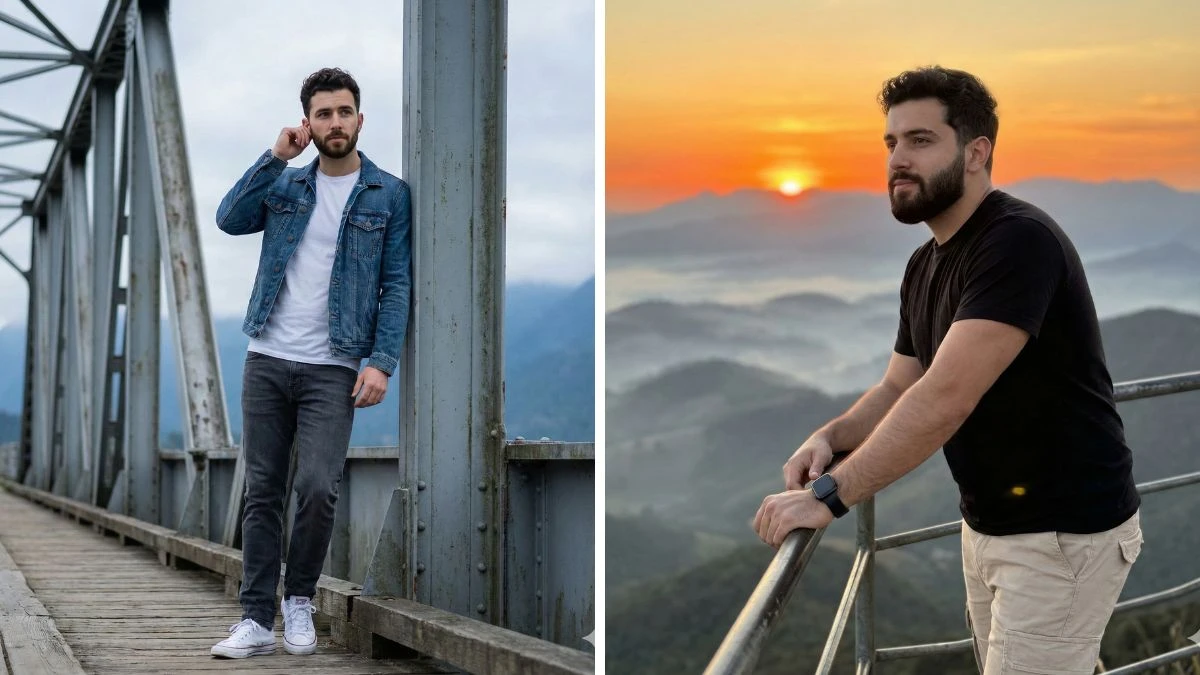
A man in his late 20s stands relaxed while leaning against the steel framework of a bridge. He has short, dark, wavy hair and a well-groomed beard. He wears a white t-shirt under a denim jacket, paired with dark grey jeans. His white Converse sneakers are clearly visible. The background shows a slightly overcast sky, with misty mountains in the distance, giving the scene a calm and serene vibe. The bridge’s metal structure is visible, with a clean, geometric pattern. The man has his right hand on his ear, as if adjusting something, with a calm and contemplative expression. The lighting is soft, contributing to the tranquil feel of the scene. Ensure that the face and features of the man are exactly the same as in the reference image. Don't change the face, make sure the face is the same.
Must Try- 12 Secs Find the Odd One Out Challenge
Prompt 3:
A man in his late 20s stands against a railing on a mountain-top viewpoint, with a breathtaking sunset sky in the background. He has short, dark wavy hair and a well-groomed beard. He wears a simple black t-shirt that highlights his athletic build, paired with light beige cargo pants. On his left wrist, he wears a black smartwatch. His hands rest on the railing, and he gazes into the distance with a calm, confident expression. The sky is filled with warm hues of orange and yellow as the sun sets behind the distant mountains, casting soft light across the scene. The background shows rolling hills and a vast mountainous landscape that fades into the horizon, with layers of fog and mist. The lighting gives a serene, peaceful vibe to the entire composition. The man's features, expression, and posture should be preserved exactly as shown in the reference image. Don’t change the face, make sure the face is the same.
Try Now- 10 Best Hunyuan Image 3.0 Photo Editing Prompts for Boys
Prompt 4:
A handsome young man standing on a high-rise balcony during the golden hour. The setting sun casts a warm, orange glow across his face and the sprawling city skyline behind him. He is wearing a beige fitted turtleneck tucked into black trousers. He leans back against the glass railing, hands in his pockets, looking off to the side with a relaxed smile. The background is a mix of skyscrapers and distant water reflecting the sun. Important: Ensure the face and features are identical to the reference image provided.
Must Try- Within 7 Seconds Find The Number 30 among 38
Prompt 5:
A young man standing under a sheltered rooftop area while rain falls softly on the city skyline behind him. The atmosphere is moody and cinematic with cool blue tones. He wears a grey hoodie layered under a darker denim jacket and cargo pants. He is holding a hot cup of coffee, blowing steam off the top, looking thoughtfully at the rain-soaked buildings in the distance. Do not change the face; keep the features identical to the provided reference.
Try Now- 12 Must-Try Qwen AI Photo Editing Prompts for Couples
Prompt 6:
A fresh morning scene with a boy standing on a penthouse terrace. The skyline in the background is shrouded in a light morning mist, with the sun just starting to break through. He is dressed casually in comfortable grey sweatpants and a fitted white long-sleeve tee. He leans his forearms on the metal railing, holding a ceramic mug, with a peaceful and sleepy expression. Ensure the face matches the reference image exactly.
Must Try- Within 7 Seconds Find The Number 30 among 38
Prompt 7:
A sophisticated shot of a young man on a luxury hotel rooftop bar. The skyline behind him is crisp and glittering in the twilight. He is dressed in a sharp navy blue suit with the top button of his white shirt undone (no tie) for a semi-formal look. He holds a mocktail glass, leaning casually against a pillar, smiling charmingly. Strictly maintain the facial features of the reference image.
Try Now- 13 Unique Google Gemini AI Photo Editing Prompts for Girls
Prompt 8:
A young man standing near the edge of a rooftop, holding a vintage camera as if he just took a picture of the view. The background is a dramatic cityscape with tall skyscrapers towering above. He wears a flannel plaid shirt over a grey t-shirt and dark chinos. He is looking down at the camera in his hands, then glancing up towards the horizon. The depth of field is shallow, focusing on him while the city blurs slightly. Make sure the face remains identical to the provided reference.
Must Try- Within 8 Seconds Spot The Number 57 and 55 among 51
Prompt 9:
A shot emphasizing cold weather on a high-rise rooftop. The air is crisp, and the boy's breath is faintly visible as mist. The skyline in the background is clear but looks cold, perhaps with snow dusting distant rooftops. He is bundled up in a thick, insulated black puffer jacket and a knit beanie. He stands with his gloved hands deep in his pockets, looking directly at the camera with a calm, steady expression. Make sure the face remains identical to the provided reference.
Try Now- 14 Magical ChatGPT AI Photo Editing Prompts for Couples
Prompt 10:
A handsome young man leaning against a concrete parapet as day turns to night. The sky behind him is a gradient of deep blue and lingering orange at the horizon, and the city lights below are just starting to twinkle on. He is dressed in a smart-casual layered look: a navy sweater over a collared shirt. He is looking sideways, slightly away from the camera, with a thoughtful half-smile. Strictly maintain the facial features of the reference image provided.
Must Try- Within 8 Seconds Spot The Inverted Number 35 and 85 among 35
How to Create Images in MidJourney AI?
-
Creating images in MidJourney AI is simple and intuitive. Here’s a step-by-step guide to get you started:
-
Join MidJourney: First, sign up for MidJourney and join their platform (usually via Discord or their official website).
-
Enter a Prompt: To create a new image, you need to provide a text prompt that describes the desired scene or portrait. For example, if you want a cinematic portrait of a boy with a skyline, describe the boy's appearance, pose, and the skyline background in detail.
-
Refine Your Prompt: Be specific in your description to achieve the exact result you want. Mention the time of day, lighting conditions, mood, and even specific elements like clothing or facial features. MidJourney’s AI will use this information to generate the image.
-
Generate the Image: After entering the prompt, click "Generate" to let MidJourney process your request. The AI will create an image based on the description, which you can review and adjust as needed.
-
Adjust and Download: If necessary, refine your prompt or adjust the settings to perfect your image. Once satisfied, download the high-resolution image for use in your projects.


















































