

Midjourney AI Ignites Star Wars Trend: 7 Prompts That Transform Portraits Into Epic Sci-Fi Art
Star Wars-style portraits are more popular than ever in 2025, with fans and creators leveraging Midjourney AI to transform ordinary photos into photorealistic works inspired by the galaxy’s iconic look.
From Jedi and Sith warriors to bounty hunters and legendary droids, these seven curated prompts make it simple to conjure epic cinematic images worthy of a blockbuster poster.
Whether you want to channel classic heroes, craft a custom Mandalorian avatar, or imagine yourself as an alien from a faraway system, Midjourney’s AI lets anyone create visually stunning Star Wars portraits, complete with intricate costumes, otherworldly lighting, and signature sci-fi backgrounds.
This guide reveals the best prompts, essential workflow, and must-use settings for fans, cosplayers, and digital artists alike.
How to Create Star Wars-Style Portraits in Midjourney
- Join Midjourney on Discord: Access the Midjourney server and locate a bot-supported channel like #newbies.
- Use the /imagine Command: Type “/imagine” followed by your prompt. Example: “Ultra-realistic Jedi portrait, cinematic lighting, dramatic shadows, detailed robe, glowing blue lightsaber, Coruscant skyline in background, 8K, octane render.”
- Adjust Details for Realism: Specify camera angle, lens (e.g., “shot on 85mm”), style (photorealistic, gritty, CG), and extra Star Wars elements like armor, droids, or signature colors for more authenticity.
- Fine-Tune With Parameters: For ultra-realistic results, use parameters:
- --v 6 for the latest model
- --ar 4:5 or --ar 2:3 for portrait orientation
- --style raw to minimize automatic beautification
- Add quality parameters: --q 2 --hd --uplight and more for 8K-level clarity.
- Review and Upscale: Midjourney generates four options, select and upscale your favorite version using the "U" buttons for high-resolution output.
- Download and Share: Save your final portrait, ready for fan art, social profiles, or digital portfolios.
Expert Tips for Epic Sci-Fi Portraits
- Layer the Prompt: Include story cues: “battle-worn Mandalorian,” “moody neon-lit Coruscant street,” or “droid companion at side” for richer images.
- Leverage Lighting Effects: Use terms like “cinematic rim lighting,” “soft bokeh background,” or “high-contrast shadows” for drama and realism.
- Specify Materials and Textures: Call out “weathered armor,” “reflective metal,” or “detailed leather belts” for tactile Star Wars detail.
- Use Character References: Name-drop iconic figures (“Leia, Han Solo, Kylo Ren”) or invent your own persona for unique edits.
- Tweak and Regenerate: Iterate your prompt, adjust style, and swap parameters for true blockbuster depth; never settle for the first result.
Join This Channel for Trending AI Image Prompts - CLICK HERE
Best Midjourney AI Photo Editing Prompts to Create Epic Realistic Star Wars-Style Portraits
Prompt 1:
"A man resembling a Star Wars character, possibly a Jedi or a rogue, in his 30s-40s with a beard and short dark hair, is standing and holding a glowing green lightsaber with both hands, positioned in front of him. He is wearing a light-colored, long-sleeved tunic, dark pants, and a shoulder piece with a utility belt adorned with pouches and other gadgets. His expression is serious and determined. The background suggests a rustic, sci-fi interior, possibly a dwelling on a desert planet, with textured walls and various mechanical components and details. The lighting emphasizes the glow of the lightsaber and casts dramatic shadows. Don't change the face, make sure the face is the same."
These 10 ChatGPT Prompts That Will Blow Your Mind - Try Now!
Prompt 2:
"An epic, digital painting-style image of Ahsoka Tano from Star Wars, in a dynamic pose. She is wielding two white lightsabers, standing amidst swirling mist or smoke. Her lekku (head-tails) are prominent, and her face is adorned with her distinctive markings. She is wearing her usual attire, a dark, muted teal-green outfit with arm guards and a cloak. Above and to her left, a white owl (Morai) is flying with its wings spread. The background features tall, dark trees with an orange-red glow emanating from behind them, suggesting either a sunset, a fire, or an alien environment. The overall mood is intense and mystical. Don't change the face, make sure the face is the same."
Prompt 3:
"A powerful Jedi Master, resembling Obi-Wan Kenobi, standing heroically in the center of a futuristic, chrome-plated hallway with illuminated vertical light panels on the walls. He is holding a glowing blue lightsaber horizontally in his right hand, poised for action. He wears traditional Jedi robes: a light-colored tunic, dark pants, and a flowing brown outer robe. Behind him and slightly to his sides, several white armored stormtroopers are visible, some with weapons, blurred slightly to emphasize the Jedi Master. The floor is reflective, showing the glow of the lightsaber and the surrounding lights. The overall atmosphere is tense and dramatic, characteristic of a Star Wars scene. Don't change the face, make sure the face is the same."
MUST TRY - 6-Second Optical Illusion: Spot 52 and 37 Among 32
Prompt 4:
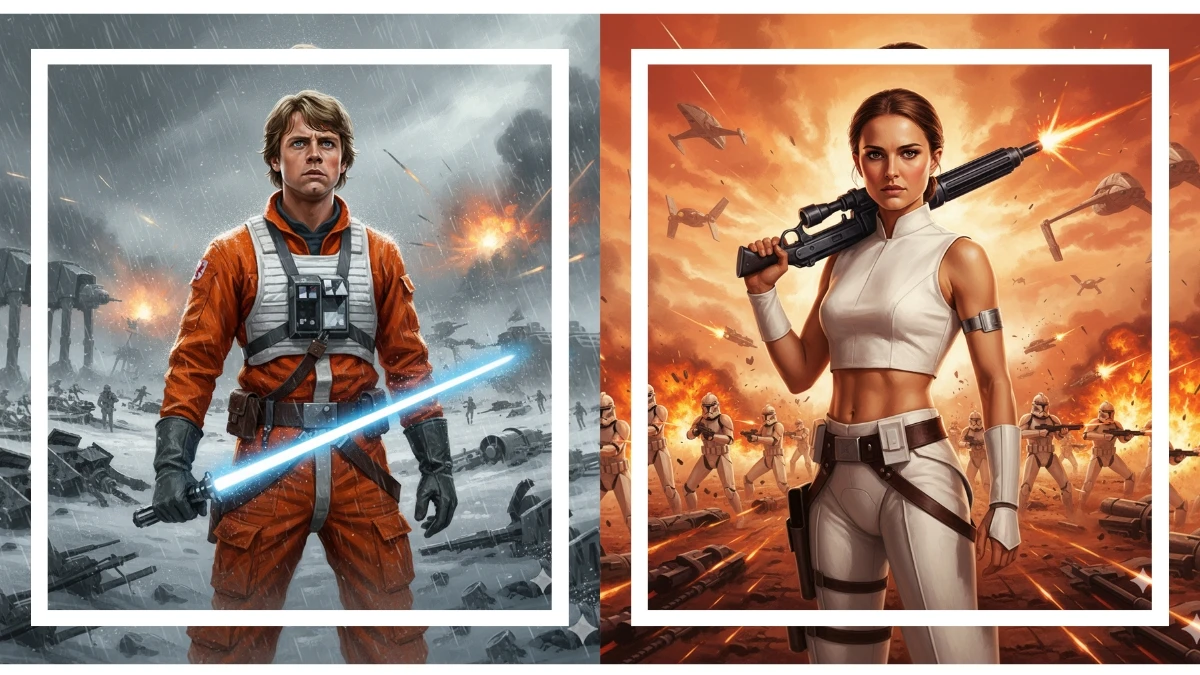
"A dramatic, painted-style depiction of a young Luke Skywalker, resembling the character from Star Wars Episode V: The Empire Strikes Back, wearing an orange Rebel pilot flight suit with a white chest harness and dark grey gloves. He holds a glowing blue lightsaber in his right hand, looking determinedly upwards and to the right. The background is a chaotic battlefield with debris, explosions, and distant stormtroopers and AT-AT walkers, suggesting a major conflict like the Battle of Hoth. The scene is rendered with dynamic brushstrokes, a wet or rainy effect, and vibrant light from the lightsaber and explosions, creating an epic and intense atmosphere. Don't change the face, make sure the face is the same."
Prompt 5:
"A heroic portrayal of Padmé Amidala, with her hair pulled back, wearing her iconic white Battle of Geonosis outfit: a cropped white top, white pants, and a utility belt. She is holding a blaster rifle confidently in her right hand, looking directly at the viewer with a determined expression. The background depicts a massive, chaotic battle scene on a red, rocky alien planet (Geonosis) with numerous clone troopers engaged in combat, flying spacecraft, explosions, and distant alien structures. The sky is fiery orange with smoke and debris, creating an intense and epic Star Wars atmosphere with a painted, illustrative style. Don't change the face, make sure the face is the same."
7 Winter-Themed Gemini AI Prompts for Cozy Viral Portraits - Try Now!


















































