
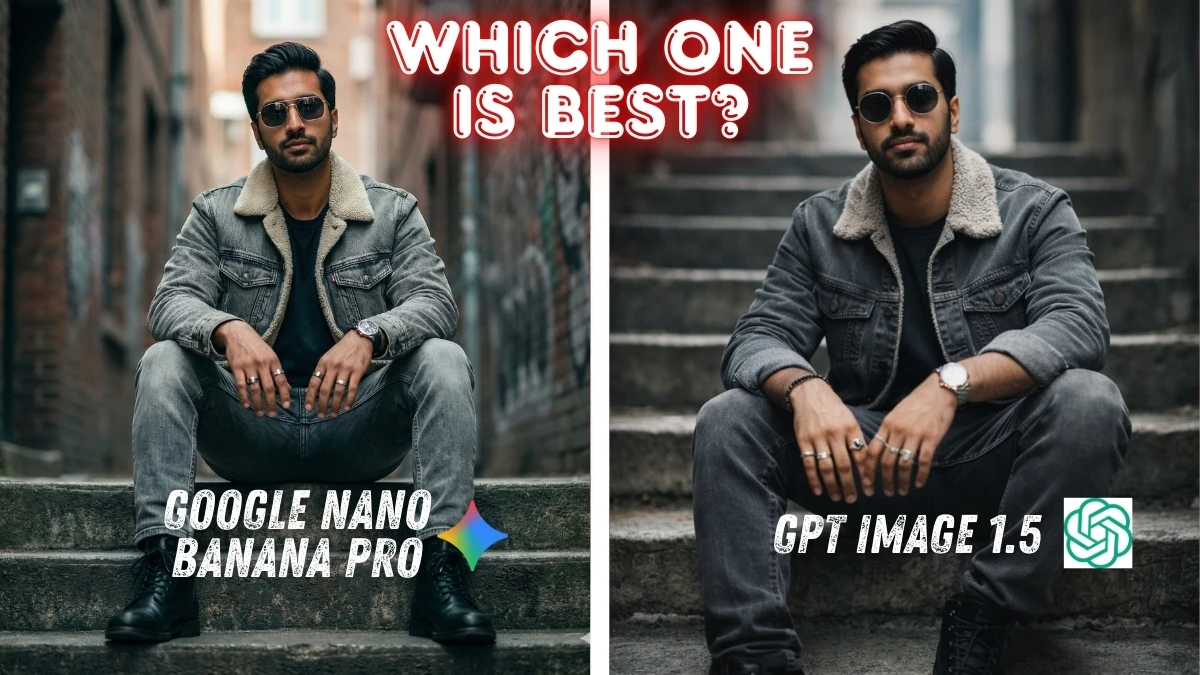

GPT Image 1.5 vs Google Nano Banana Pro: Which Is Best?
When people ask “Which AI image generator is best?” the honest answer is usually “it depends on what you care about.”
This comparison between GPT Image 1.5 and Nano Banana Pro isn’t about benchmarks, specs, or marketing claims. It’s about real-world creative output, how these models perform when pushed with long, demanding prompts that aim for intentional artistry, not just attractive results.
To test this properly, both models were given the exact same prompts, covering cinematic portraits, high-fashion studio setups, clean commercial photography, and gritty urban editorial scenes. No prompt tuning. No adjustments. Same creative brief, same expectations.
What emerged from this head-to-head was more nuanced, and more interesting, than a simple winner/loser verdict.
Prompt Complexity: Where the Test Really Begins
The prompts used here are not lightweight. They include:
- Precise lighting setups (gel colors, rim light direction, contrast ratios)
- Camera metadata (sensor type, focal length, aperture, shutter speed)
- Composition rules (leading lines, asymmetry, framing)
- Color grading instructions (neon-noir, teal & orange, commercial high-key)
- Texture preservation (skin pores, fabric fibers, tattoos)
- Identity constraints (no retouching, no facial alteration)
These prompts are intentionally over-specified. That’s where weaker image models tend to collapse, ignoring half the instructions or producing visually pleasing but creatively generic images.
Why Prompt Design Matters More Than the Model
The prompts used here go far beyond “make a nice portrait.” They include:
- Multi-light studio setups with gels
- Cinematic color grading instructions
- Camera metadata (lens, aperture, ISO, shutter)
- Identity preservation and texture realism
- Composition theory (leading lines, asymmetry, depth separation)
This is where weaker models usually fail, by flattening lighting, ignoring color theory, or over-smoothing skin. The differences between GPT Image 1.5 and Nano Banana Pro become obvious only when prompts demand precision.
Real, Usable Example Prompts (You Can Copy These)
Below are cleaned, production-ready prompt examples you can actually use with either GPT Image 1.5 or Nano Banana Pro.
Example 1: High-Fashion Neon Studio Portrait
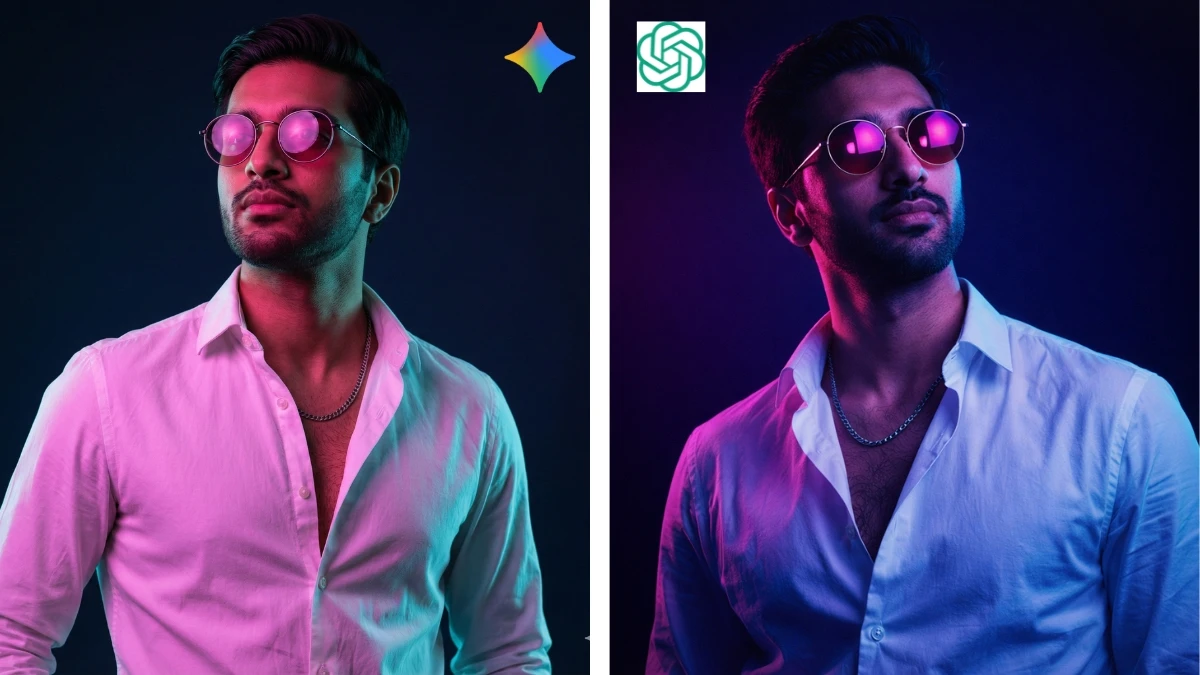
"Ultra-realistic high-fashion studio portrait with a synthwave neon aesthetic. Edgy editorial atmosphere with dramatic dual-tone lighting using colored gels.
Lighting setup: strong magenta gel key light from front-left, strong teal gel rim light from back-right outlining jawline and neck.
Accessories: round metal-framed sunglasses with pink tinted lenses reflecting studio lights, silver chain necklace.
Wardrobe: crisp white button-down shirt, unbuttoned to reveal upper chest, fine cotton texture with visible folds.
Pose: shoulders relaxed, torso angled slightly away from camera, head tilted upward, confident and stoic expression.
Environment: professional photography studio with deep navy-to-black background, smooth gradient falloff.
Camera: medium-format digital, 100mm portrait lens, f/4, ISO 100, eye-level angle.
Color grading: neon-noir, complementary magenta and cyan palette, crushed blacks with subtle teal undertones.
Ultra-realistic textures, visible skin pores, no beauty retouching, no smoothing."
Example 2: Cinematic Urban Street Fashion Portrait
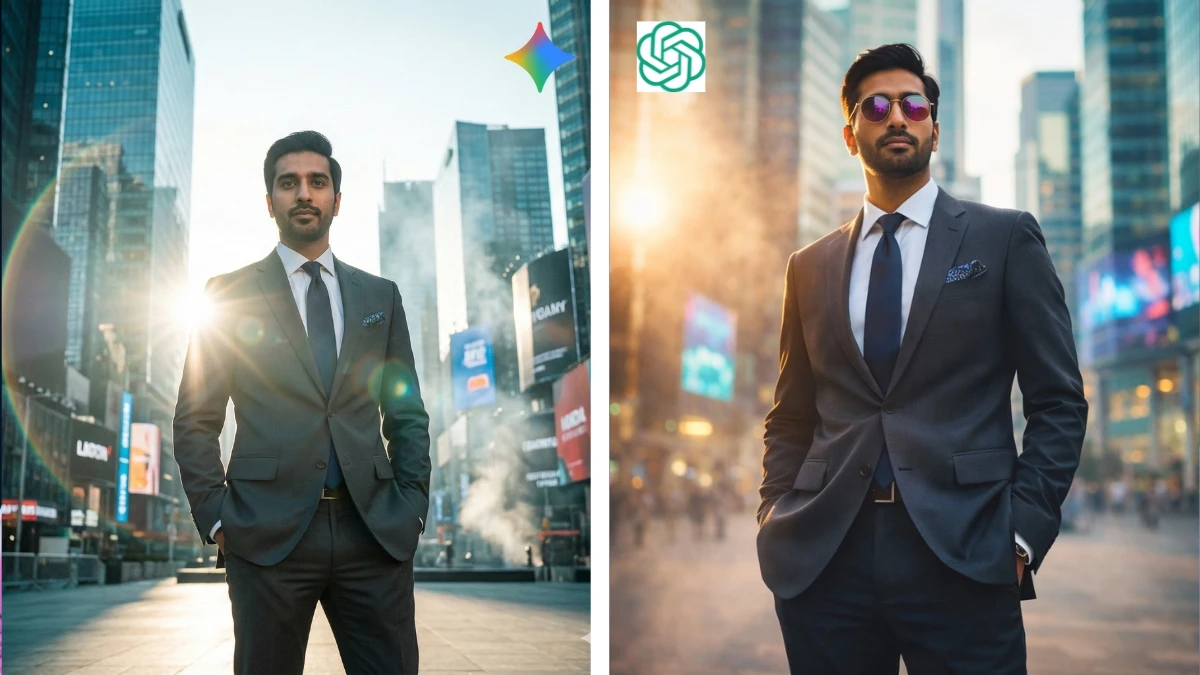
"Cinematic street fashion portrait with editorial realism. Subject standing confidently in a modern city square with tall glass skyscrapers and illuminated digital billboards.
Pose: standing upright, hands in trouser pockets, relaxed but dominant stance.
Lighting: strong natural sunlight backlighting the subject, creating a bright rim light around the silhouette; large cinematic lens flare on the left side of frame.
Atmosphere: soft haze and light cinematic smoke, strong separation from background.
Camera: full-frame digital camera, 35mm lens, f/1.8, ISO 100, low-angle shot, shallow depth of field.
Color grading: teal and cyan shadows with warm golden highlights, cinematic S-curve contrast.
Preserve natural skin texture, subtle film grain, no face alteration, no beauty retouching."
Example 3: Clean Commercial Studio Portrait (High-Key)
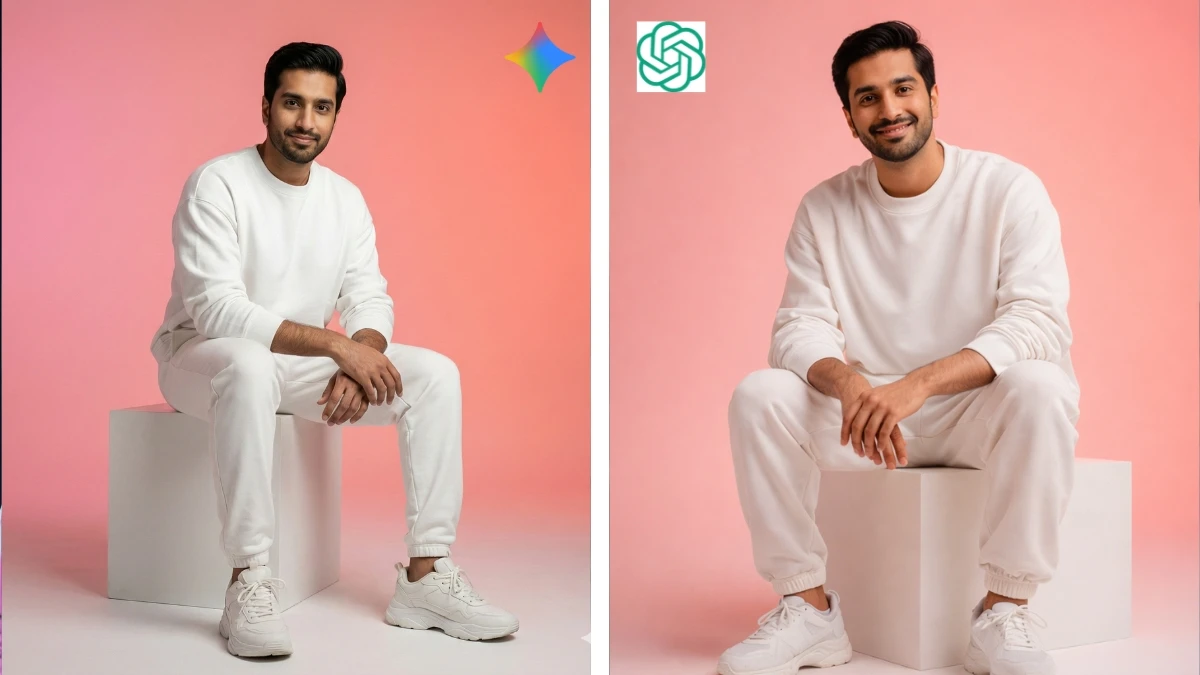
"Ultra-realistic studio portrait of a young man seated on a minimalist white cube.
Environment: smooth pink-to-coral gradient seamless background, clean commercial athleisure style.
Wardrobe: oversized white sweatshirt, relaxed white joggers, chunky white sneakers, no accessories.
Pose: seated with relaxed posture, forearms resting on thighs, soft friendly smile, direct eye contact.
Lighting: large soft key light at 45° camera-left creating gentle shadows; subtle fill from camera-right; even background lighting for smooth gradient.
Camera: full-frame sensor, 50mm lens, f/4, ISO 100, eye autofocus.
Color grading: clean commercial look, preserved highlights, soft contrast, warm skin tones.
No HDR, no diffusion, no grain, no retouching, ultra-realistic texture."
Example 4: Moody Cinematic Alley Portrait
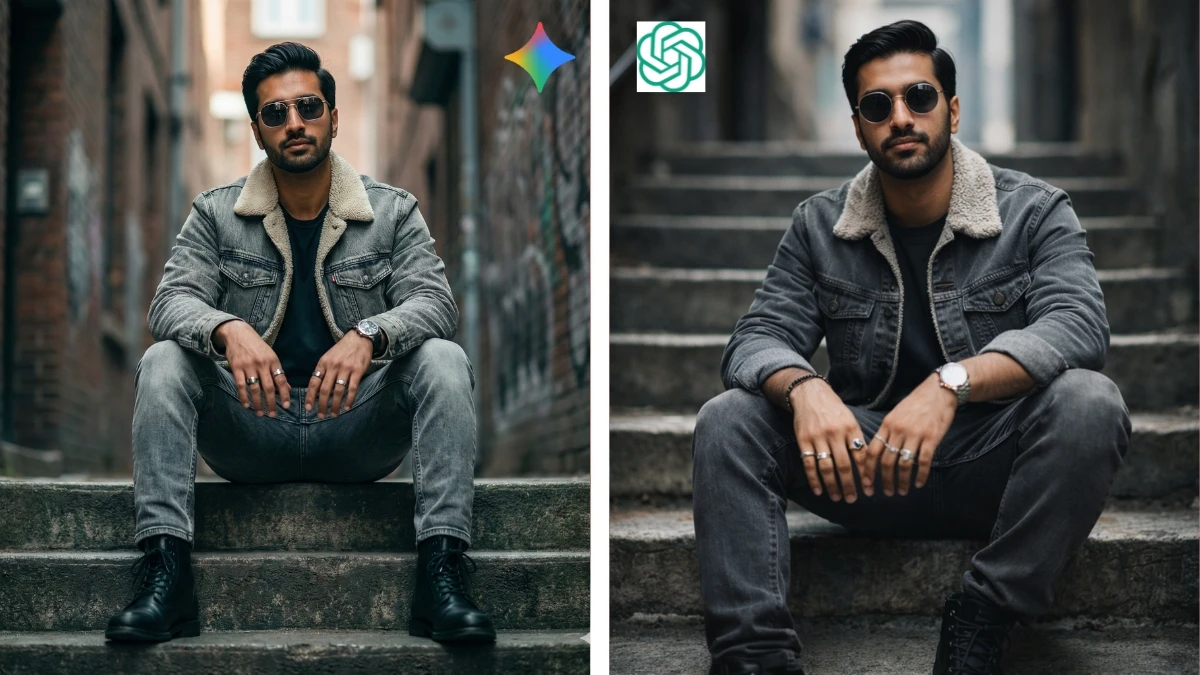
"Ultra-realistic cinematic urban portrait of a stylish subject seated on worn concrete stairs in a narrow alley.
Mood: moody editorial street style with shallow depth of field and soft background blur.
Wardrobe: faded grey denim jacket with shearling collar, dark t-shirt, washed grey jeans, black lace-up boots.
Accessories: metal sunglasses, rings on both hands, wristwatch.
Lighting: soft natural daylight from above and slightly frontal, smooth shadow transitions, no flash look.
Camera: full-frame digital camera, 85mm lens, f/1.8, ISO 200, slightly low angle.
Composition: centered subject with strong leading lines from stair edges.
Color grading: cinematic teal and orange tones, cool greys with warm skin highlights.
Preserve fabric texture, skin pores, tattoos, minimal vignette, no plastic skin."
GPT Image 1.5: Unexpectedly Refined
The biggest surprise in this comparison was GPT Image 1.5’s control over lighting and mood.
Where GPT Image 1.5 Excels
1. Lighting realism
GPT Image 1.5 consistently respected:
- Directional light sources
- Gel color separation (magenta vs cyan, teal rim lights, warm daylight bias)
- Smooth falloff and shadow transitions
Instead of “painted-on” lighting, the results felt photographic—as if lit in a real studio or real street environment.
2. Color grading consistency
Across cinematic and editorial prompts, GPT Image 1.5 maintained:
- Stable color palettes
- Cohesive shadow tones
- Controlled highlight roll-off
This matters a lot for creators aiming at fashion editorials, cinematic portraits, or brand visuals, where color harmony is more important than raw sharpness.
3. Aesthetic restraint
GPT Image 1.5 doesn’t overcook images. Skin texture remains natural. Contrast is deliberate. Grain, when present, feels intentional rather than noisy. The model seems to understand when not to exaggerate.
In artistic and cinematic scenes, this restraint makes the images feel finished, not synthetic.
Nano Banana Pro: Still Strong, Still Reliable
Nano Banana Pro remains a very solid image generator, especially for creators who want immediate visual impact.
Where Nano Banana Pro Shines
1. Micro-detail and sharpness
Nano Banana Pro often delivers:
- Very crisp textures
- Strong fabric definition
- Bold contrast out of the gate
For social media visuals, thumbnails, or high-impact portraits, this sharpness can be an advantage.
2. Consistency with structured prompts
It handles long prompts well and rarely “breaks” completely. The output is dependable and visually appealing, even when instructions get complex.
3. Speed and predictability
Nano Banana Pro tends to produce results that align closely with expectations, especially for users who prioritize clarity and punch over subtle mood.
That said, when prompts leaned heavily into cinematic nuance, lighting realism, and color grading subtlety, Nano Banana Pro sometimes felt a bit more digital, less organic than GPT Image 1.5.
Which One Is Actually Best?
Choose GPT Image 1.5 if:
- You care about cinematic realism
- Lighting accuracy matters
- You’re creating fashion editorials, film-style portraits, or brand visuals
- You value cohesive color grading and natural textures
Choose Nano Banana Pro if:
- You want bold, sharp images quickly
- High contrast and punch matter more than subtle mood
- Your use case leans toward social media, marketing visuals, or eye-catching portraits
Final Thoughts
This comparison shows that GPT Image 1.5 is not just “good for an AI model”, it’s artistically mature. Its handling of light, color, and atmosphere is more refined than many would expect, especially when prompts are written with real photographic intent.
Nano Banana Pro remains a powerful and reliable tool, but GPT Image 1.5 quietly takes the lead in creative nuance, the kind of details that separate a nice image from a deliberate visual statement.
If your goal is more than just “a pretty picture,” GPT Image 1.5 deserves serious attention.
Disclaimer: This comparison is based on personal testing and subjective visual evaluation using identical prompts at the time of writing. Results may vary depending on prompt structure, model updates, and individual creative preferences. This content is not sponsored or affiliated with any AI image generation platform and reflects independent, real-world experimentation rather than official benchmarks.


















































