

Creators Embrace Retro Cinema Look as 11 Midjourney AI Photo Prompts Go Viral for Teal & Orange Scenes
“11 Midjourney AI Photo Editing Prompts Copy-Paste to Create Cinematic Retro Scenes With Teal and Orange Movie Look” is designed for creators who want instant Hollywood-style visuals without learning complex color grading or film theory.
The article gives ready-to-use Midjourney prompts that combine retro film aesthetics, teal-and-orange grading, and dramatic lighting so any scene, street portraits, alley shots, car scenes, or cityscapes, looks like a frame from a classic movie trailer.
Each of the 11 prompts is structured to handle subject, era details, lighting, lens, and teal–orange color grade, so users can just copy, paste, tweak a few words, and instantly generate cohesive cinematic series for posters, thumbnails, and social campaigns.
Readers also learn basic Midjourney settings, aspect ratios, and parameters that enhance the retro mood with film grain, soft focus, and rich shadows, giving their AI edits the same visual language seen in modern blockbuster color grading.
Simple steps: how to create the image
Join Midjourney and open a prompt box
- Log in to Discord or the Midjourney web interface and make sure your Midjourney subscription is active.
- On Discord, go to a channel where the Midjourney bot is allowed; on web, use the Imagine bar on the Create page.
Use the /imagine command
- Type /imagine (on Discord) or just start typing in the Imagine bar, followed by your text prompt.
Copy-paste a teal & orange retro prompt
- From the article, copy one of the 11 prompts that mentions cinematic scene + retro film style + teal and orange color grade.
- Paste it after /imagine prompt: and, if needed, swap the subject (e.g., “retro city street,” “lone driver,” “neon diner at night”).
Add basic parameters
- Add simple parameters like aspect ratio and quality, for example: --ar 16:9 --style raw for a movie-frame look.
Generate and review
- Send the message; Midjourney will return a grid of four options in under a minute.
- Check which image has the best composition, teal–orange balance, and retro mood.
Upscale and download
- Use the U1–U4 buttons (or equivalent in the latest UI) to upscale your favorite image to full resolution.
- Open the upscaled image and save/download it for editing or publishing.
Tips and tricks for cinematic teal & orange retro scenes
Always mention teal and orange clearly
- Use phrases like “teal and orange cinematic color grade,” “orange highlights, teal shadows,” or “Hollywood teal–orange LUT” to lock in the look.
Build a strong cinematic prompt structure
- Combine subject + setting + era + lighting + lens + mood, for example “80s city street at night, neon lights, shot on 35mm film, dramatic volumetric lighting, teal and orange grade, film grain.”
Use film-like details
- Add “film grain,” “soft halation,” “slight glow around highlights,” or “vintage lens flare” to avoid a flat digital look and push a retro movie vibe.
Control contrast and atmosphere
- For punchy images, mention “rich shadows, high contrast, deep blacks.” For moodier scenes, add “soft haze,” “atmospheric fog,” or “subtle bloom.”
Match aspect ratio to use case
- Use --ar 16:9 for YouTube thumbnails or movie shots, --ar 9:16 for reels/shorts, and --ar 4:5 or 1:1 for Instagram posts.
Iterate with variations, not just re-rolls
- When you like a composition but want minor tweaks, press V1–V4 to get similar versions; use Re-roll only if the whole grid feels off.
Save your best “base prompt”
- Once a teal–orange retro formula works, save it as a base and just swap subjects (car, character, location) to keep a consistent cinematic style across many images.
Join This Channel for Trending AI Image Prompts - CLICK HERE
Midjourney AI Photo Editing Prompts Copy-Paste to Create Cinematic Retro Scenes With Teal and Orange Movie Look
Prompt 1:
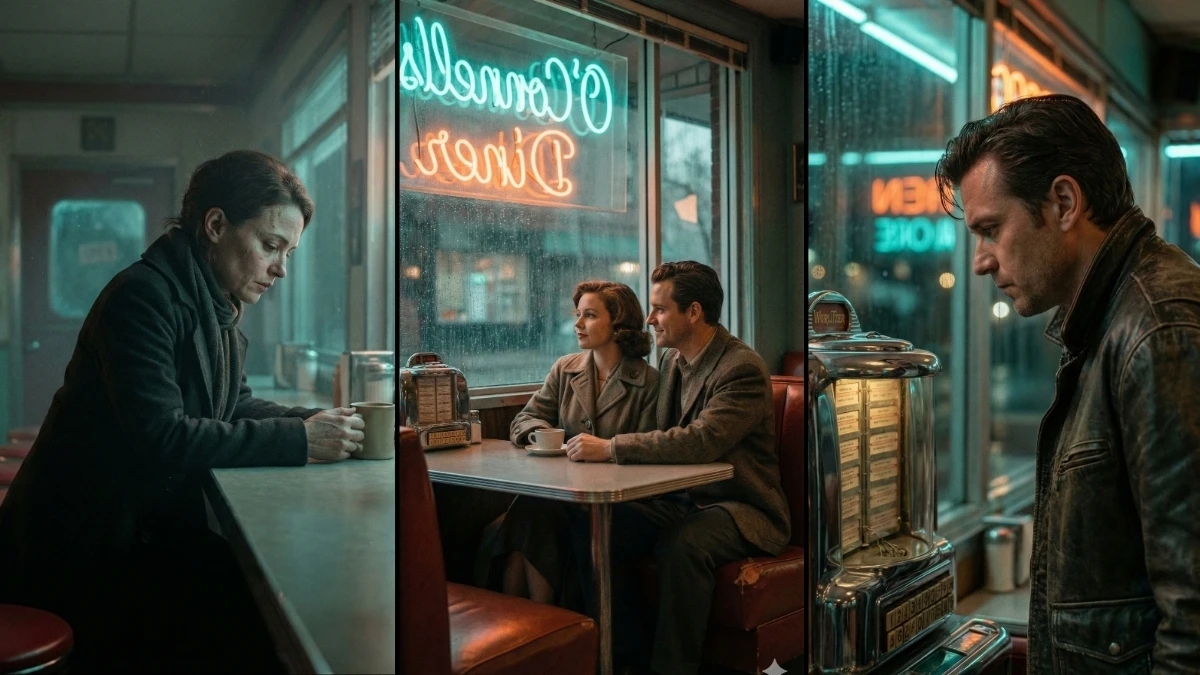
"Create a cinematic, movie-like scene of a solitary woman sitting at the counter of a retro 1950s diner late at night, staring into her coffee cup. The scene should be highly cinematic, featuring a professional teal and orange color grade. A soft glow from a neon sign should emanate, filtering through the window and creating a soft cinematic haze. The mood should be contemplative and reflective. Add a layer of post-production film grain for an authentic touch. Focus on hyper-realistic details, especially on the woman's skin texture. --ar 9:16 --style raw --v 7 --stylize 250"
Prompt 2:
"Create a cinematic scene of a solitary man standing in front of an old vintage jukebox in a dimly lit 1950s diner. The man should be dressed in a leather jacket, looking thoughtfully into the jukebox with a contemplative expression. The scene should feature a teal and orange color grade with a soft glow from neon lights filtering through the diner window. Add subtle film grain for an authentic touch and focus on hyper-realistic details like reflections on the jukebox and the man's skin texture. --ar 9:16 --style raw --v 7 --stylize 250"
15 Google Gemini AI Prompts for Ultra-Realistic Golden Hour Taj Mahal Portraits - Try Now!
Prompt 3:
"Design a cinematic 1950s diner scene with a couple sitting in a red vinyl booth, sharing a quiet moment. The woman should be looking out the window, while the man watches her, with soft neon light glowing around them. The scene should have a professional teal and orange color grading, creating a nostalgic yet moody atmosphere. Use a film grain effect and focus on realistic details like the texture of the booth cushions and the neon reflections on the glass. --ar 9:16 --style raw --v 7 --stylize 250"
Prompt 4:
"Create a cinematic retro scene of a lone woman walking along a deserted street at night, passing by a retro diner with glowing neon lights. The street should be wet from a recent rain, reflecting the neon signs. Use a teal and orange movie color grade to evoke a reflective, melancholic mood, with a layer of post-production film grain. Add intricate details to her outfit and the reflections on the wet street for a hyper-realistic, atmospheric touch. --ar 9:16 --style raw --v 7 --stylize 250"
MUST TRY - Spot the Numbers 96 and 86 in 7 Seconds Challenge
Prompt 5:
"Design a cinematic movie scene of a vintage car parked outside a 1950s diner late at night. The car’s headlights should create a dramatic contrast with the neon lights of the diner. The teal and orange color grading should give the scene a nostalgic and dreamy vibe, with a soft haze from the neon sign filtering through the window. Add post-production film grain for texture, focusing on the reflections on the car’s chrome details and the diner’s glass window. --ar 9:16 --style raw --v 7 --stylize 250"
Prompt 6:
"Create a cinematic, retro diner scene at dusk with a man sitting alone at the counter, smoking a cigarette. The neon sign outside the diner should glow in teal and orange hues, casting a soft, cinematic light on the man. The mood should be reflective and lonely, with a layer of post-production film grain to add texture. Focus on realistic details like the smoke curling up and the glint of light on the coffee cup. --ar 9:16 --style raw --v 7 --stylize 250"
Top 15 Google Gemini AI Photo Editing Prompts for Stunning Images - Try Now!
Prompt 7:
"Design a movie-like scene of a young woman sitting alone in a 1950s diner booth, staring at a cup of coffee. The soft glow of neon lights in teal and orange should filter through the window, creating a cinematic haze. The scene should have a reflective mood, with a post-production film grain effect adding an authentic touch. Focus on hyper-realistic details like the texture of the coffee cup, the woman’s skin, and the reflective surface of the booth. --ar 9:16 --style raw --v 7 --stylize 250"
Prompt 8:
"Create a cinematic 1950s diner scene of a lone man standing outside, looking up at the neon sign with his hands in his pockets. The neon lights should cast a soft glow on his face, and the background should have a soft blur with teal and orange hues. Add film grain for an authentic vintage feel and focus on the intricate textures of the diner sign, the man’s jacket, and the light reflections. --ar 9:16 --style raw --v 7 --stylize 250"
MUST TRY - Spot the Inverted 55 in 5 Seconds IQ Test
Prompt 9:
"Design a cinematic retro scene inside a 1950s diner, with a woman sitting alone at the counter, sipping her coffee. The teal and orange color grading should give the scene a nostalgic, cinematic glow, with soft light from the neon sign outside filtering through the window. Add film grain and focus on realistic details such as the reflection of the neon lights in her coffee cup and the texture of her skin. --ar 9:16 --style raw --v 7 --stylize 250"
Prompt 10:
"Create a retro 1950s diner scene at night with a man in a leather jacket sitting in a booth, staring into his drink. The teal and orange color grading should highlight the glow from the neon lights outside the diner. The mood should be contemplative, with subtle film grain to enhance the vintage feel. Focus on realistic details like the reflection of the neon sign on the booth's surface and the texture of the man’s jacket. --ar 9:16 --style raw --v 7 --stylize 250"
10 Google Gemini AI Prompts for Cinematic Couple Portraits - Try Now!


















































