

Qwen AI Sets Creative Benchmark: 6 Viral Editing Prompts Turn Boys’ Photos into Artistic Masterpieces
AI-powered image transformation is redefining creativity for boys in 2025, with Qwen AI leading the way in effortless, versatile photo editing.
This article spotlights six ready-to-use Qwen AI prompts, designed to turn everyday portraits and casual snaps into visually stunning masterpieces, ranging from cinematic looks, surreal backgrounds, and movie-poster vibes to magazine-quality finishes.
No need for complex software or technical know-how: Qwen AI’s smart editing engine handles lighting, perspective, and style with precision, helping everyone, from social media enthusiasts to professional content creators, unlock new dimensions of self-expression and glamour.
How to Create the Image in Qwen AI
- Access Qwen AI Image Editor: Open CreateVision.ai, EnhanceAI, or the official Qwen app for image editing capabilities.
- Upload Your Photo: Use a sharp, well-lit image (JPG, PNG, or WebP). Aim for at least 1024×1024 resolution for the best results.
- Paste/Craft Your Prompt: Choose from the six prompts, like “Create a cinematic portrait of a teenage boy, soft moody lighting, faded background, glossy hair, dramatic shadows, magazine editorial style.”
- Set Editing Parameters: Adjust aspect ratio (1:1, 4:5), output to 8K if supported, and specify style (fashion, comic, cinematic, surreal).
- Generate the Image: Click ‘Generate’ and let Qwen AI process your prompt. Wait a few seconds for an instantly rendered edit.
- Review and Refine: If needed, tweak the prompt (change mood, background, colors, effects) and rerun for improved results.
- Download and Share: Export your masterpiece for Instagram, stories, or further creative edits.
Pro Tips for Qwen AI Creative Edits
- Be Detailed with Prompts: Specify mood, lighting, effects, and scene context for tailored, striking results.
- Try Multi-Image Edits: Use Qwen’s support for image concatenation, blend your portrait with cars, school scenes, or city backgrounds seamlessly.
- Experiment with Unique Styles: Move beyond standard edits; request surreal backgrounds, comic book effects, poster headlines, or even object swaps.
- Leverage Edge and Depth Maps: For advanced users, Qwen supports ControlNet tools, helping shape fine detail and depth to boost realism.
- Iterate and Save Best Versions: Adjust your prompts, output parameters, and download several variants to compare and showcase the most impactful masterpiece.
Join This Channel for Trending AI Image Prompts - CLICK HERE
Qwen AI Photo Editing Prompts Copy-Paste for Boys: You Must Try to Turn Simple Photos into Creative Masterpieces
Prompt 1:
"Transform the uploaded image into a 64K DSLR resolution portrait of an ultra-realistic young man (same face as the uploaded image) standing calmly at the center of a wide horizontal swirling spiral made of everyday objects—books, cups, pens, shoes, clothes, pillows, blankets, bags, etc., floating and rotating gently around him. The swirling motion expands outward and recedes deep into the cozy bedroom, creating a dynamic tunnel-like depth effect. The room features a bed, desk, and soft daylight streaming through a window. The composition should be cinematic and wide-angle, with natural warm lighting and a shallow depth of field. The background should feature creamy bokeh, subtle motion blur showing the rotation of objects, while the man’s face is in sharp focus. Use Octane Render and Unreal Engine 5 to achieve high-quality realism and depth."
Prompt 2:
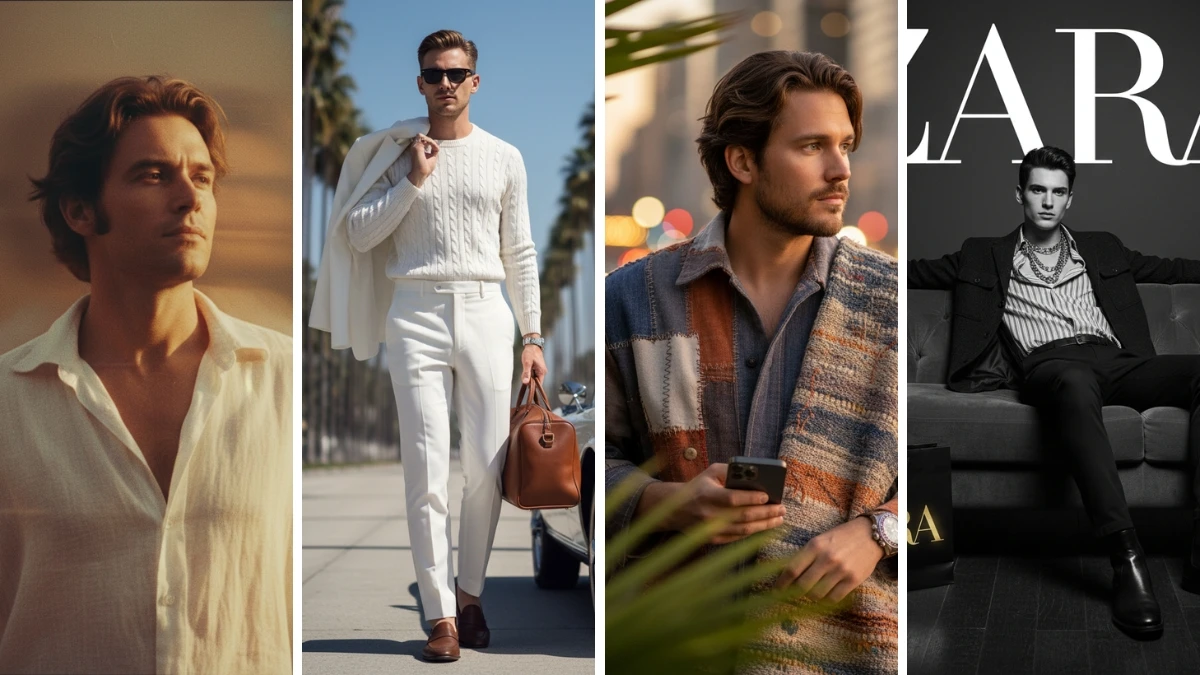
"Create an 8K cinematic portrait of a man gently moving in front of a dim, amber-lit background. Capture the motion with a subtle blur, giving the illusion of fading memories. His loose white shirt and tousled hair glow softly in warm golden light, adding a nostalgic, film-like texture to the image. His expression is distant yet calm, as if he's lost in a memory. Slight grain and light flares enhance the analog aesthetic, evoking a dreamlike, emotional still from a 1970s romantic art film. The overall atmosphere should feel both timeless and intimate."
7 Hunyuan 3.0 Prompts for Viral Luxury Car Edits - Try Now!
Prompt 3:
"Transform the uploaded image into a 64K DSLR resolution black and white artistic photograph featuring a young man (same face as the uploaded image) with short hair, captured in profile. The image should use a multiple exposure technique, creating a layered, ghost-like effect with several semi-transparent overlapping profiles of the same man, gradually fading into the background. The man is wearing a dark blazer or jacket, and his expression is calm and introspective. The overall composition should emphasize motion and depth through the repeated, fading profiles, set against a plain, light-colored background. Use Octane Render and Unreal Engine 5 to achieve ultra-realistic detail and a cinematic aesthetic."
Prompt 4:
"Create an ultra-realistic 8K portrait of me, wearing an oversized handmade outfit, black shoes, and a silver handmade watch. I am looking thoughtfully off-camera, holding an iPhone 17 Pro, while leaning casually against a wall. In the foreground, there are blurred green leaves adding a natural touch. My skin should appear flawless and glowing, and the background should feature vibrant bokeh city lights, creating a warm cinematic mood. The overall atmosphere should be soft yet dynamic, with a focus on my face, which must remain 100% the same as the reference image."
MUST TRY - 6-Second Optical Illusion: Spot 52 and 37 Among 32
Prompt 5:
"Create a hyper-realistic cinematic black-and-white portrait of a young man (use the reference face) sitting stylishly on a modern velvet sofa in a luxurious interior. He wears a bold fashion outfit: a striped shirt with the top buttons open, layered necklaces visible, paired with slim dark trousers and polished leather boots. Over his shirt, he wears a dark casual jacket, blending elegance and relaxed charm. He leans back comfortably on the sofa with one arm stretched across the backrest, exuding a confident, editorial vibe. On the floor next to him, place a SFFIE shopping bag (use the provided reference bag image), designed in monochrome with the word "ZARA" written in metallic gold, glowing subtly to add a touch of luxury. Above the model, display the ZARA logo (use the provided reference logo image) in pure white, stretched across the entire width of the image like a prestigious magazine cover or campaign billboard. The composition should be dramatic black-and-white with sharp contrasts, highlighting the gold "ZARA" on the bag. The atmosphere should be cinematic, moody, and editorial, reminiscent of a luxury fashion campaign. Ensure ultra-detailed fabrics, monochrome tones, HDR cinematic shadows, DSLR depth of field, and an 8K ultra-realistic photography style. Reference images should be used for the ZARA logo, the ZARA bag, and the base portrait composition to ensure accuracy."
Prompt 6:
"Create a hyper-realistic cinematic portrait of a young man (use the reference face) walking confidently along a palm-lined boulevard, exuding timeless elegance. He is dressed in an all-white luxury outfit: tailored high-waist trousers, a fitted cable-knit sweater, and a light blazer casually slung over his shoulder. He wears dark sunglasses and polished brown loafers, holding a stylish leather travel bag in his hand. Beside him, a vintage white convertible sports car is parked, its polished chrome details gleaming in the sunlight. The background features tall palm trees stretching into the distance under a clear blue sky, creating a cinematic, luxurious California or Riviera atmosphere. The mood should be sophisticated, fashionable, and editorial, resembling a luxury lifestyle campaign. The scene should include ultra-detailed fabrics, natural skin tones, cinematic HDR lighting, DSLR depth of field, and an 8K ultra-realistic photography style."
7 Best Midjourney Prompts for Epic Star Wars-Style Portraits - Try Now!


















































