
Your ChatGPT Conversations Aren't Private? What You Need to Know
In an era where AI chatbots like ChatGPT feel like our trusty digital confidants, it's easy to spill our thoughts without a second guess. Late-night brainstorming sessions, quirky hypotheticals, or even venting about a tough day, it's all just between you and the bot, right?
Well, not anymore. OpenAI's recent policy update has flipped the script on privacy, and it's time we all pay attention. If you've ever treated ChatGPT like a private diary, this could be your wake-up call. Let's dive into what this means and how you can navigate it smartly.
The Big Policy Shift: No More Absolute Secrecy
OpenAI has made it crystal clear: your conversations with ChatGPT are not inherently private. The company has updated its guidelines to emphasize that chats can be reviewed and even shared under certain circumstances. Specifically, if the AI system detects something that signals an "imminent threat of violence," it doesn't stay buried in the digital ether.
Here's how it unfolds:
- AI Detection: The system flags potentially dangerous content automatically.
- Human Intervention: Real people, OpenAI reviewers, step in to read the conversation for context.
- Escalation to Authorities: If the threat seems credible, the data gets handed over to law enforcement without hesitation.
This isn't just theoretical. The change was prompted by a real-world tragedy that highlighted the risks of unchecked AI interactions. OpenAI is now prioritizing public safety over blanket privacy, which makes sense in a world where words can lead to actions. But for everyday users, it raises a big question: How "private" are your chats really?
What Could Get You Flagged?
You might be wondering, "What exactly triggers this alarm?" It's not about casual chit-chat or even edgy jokes in most cases. The focus is narrowly on imminent threats of violence, such as explicit plans or statements that could indicate real harm to others.
OpenAI's AI is trained to spot these red flags, but it's the human reviewers who make the final call. Imagine typing out a frustrated rant or a hypothetical scenario that gets misinterpreted.
While the system isn't spying on every word, this update means there's a mechanism in place for oversight. And once flagged, your "private" exchange could end up in the hands of the police.
As the policy states, "ChatGPT conversations could be shared with law enforcement agencies." It's a stark reminder that AI platforms aren't isolated bubbles.
Why This Matters: A Word from the Top
OpenAI's CEO, Sam Altman, has been upfront about this. He warns that ChatGPT is not your lawyer or therapist. There's no legal confidentiality privilege here, unlike talking to a professional, where your words are protected by law.
Anything you type could potentially be scrutinised, used as evidence, or even turned against you in court. This shift underscores a broader lesson: AI is an incredible tool for productivity, creativity, and strategy.
Need help drafting an email, brainstorming ideas, or learning a new skill? Go for it. But when it comes to sensitive personal data, legal matters, or deep emotional confessions? That's where you draw the line.
Treating AI like a sounding board for your deepest secrets could backfire in ways you never anticipated.
How to Protect Yourself in the AI Age
So, how do you enjoy the benefits of ChatGPT without risking your privacy? It's all about smart digital hygiene. Here are practical, step-by-step tips based on the latest settings (as of December 2025) to manage your data effectively.
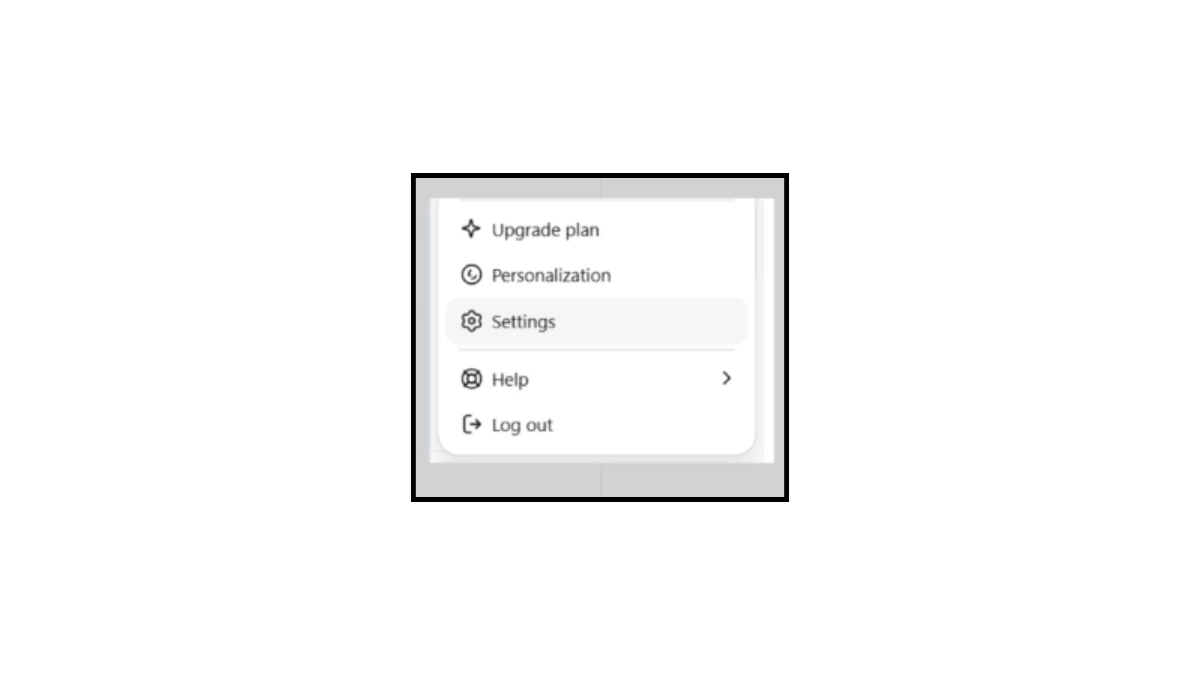
These align with OpenAI's current interface and can be accessed via web or mobile app. Start by clicking your profile icon (bottom left on web) or tapping the menu (top left on mobile) to reach Settings.
1. Access Your Main Settings Menu: Begin by opening the user menu. This gives you quick access to key privacy areas like Personalization, Settings, Help, and more. From here, navigate to Personalization or Data Controls to make changes. (Note: If you're on a free plan, consider upgrading if needed for advanced features, but it's not required for basic privacy tweaks.)
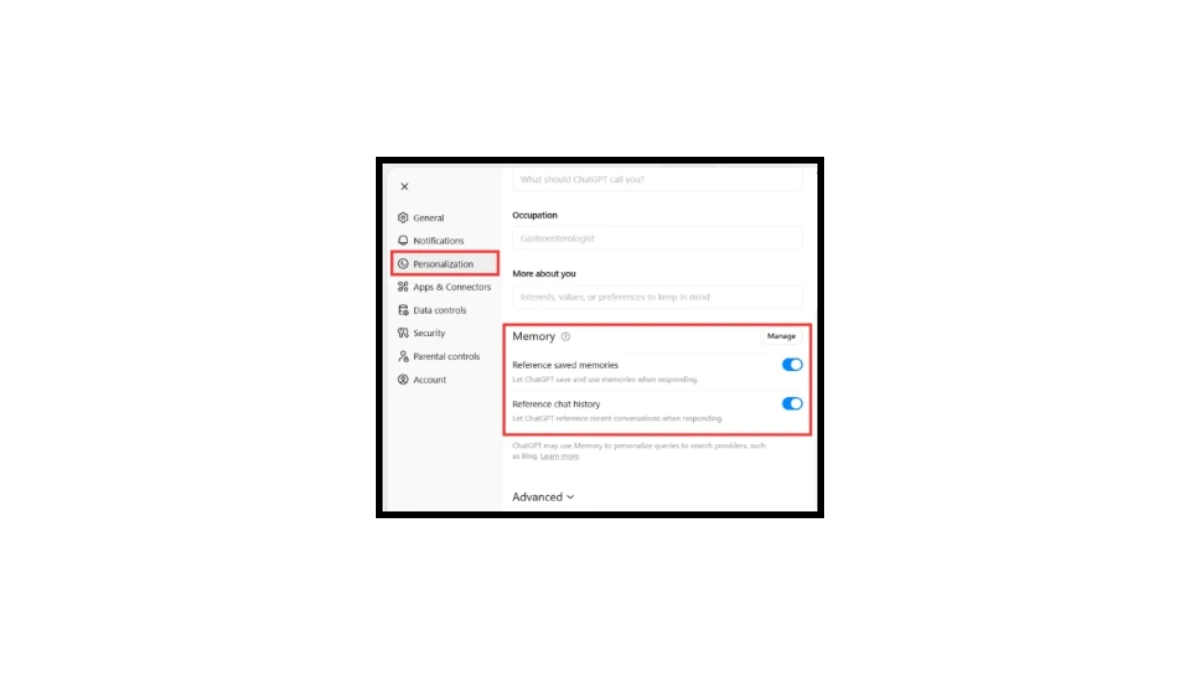
2. Disable Personalization and Memory Features: Go to Settings > Personalization. Turn off toggles for "Reference saved memories" (prevents ChatGPT from using manually saved personal details) and "Reference chat history" (stops automatic referencing of conversation fragments). This ensures the AI doesn't retain or recall sensitive info like your preferences or past discussions. You can also manage and delete specific memories here; deleting the source chat removes them fully.
3. Manage Your Chats in Data Controls: Navigate to Settings > Data Controls. Here, click "Manage" next to options like Archived chats or Shared links. Use "Archive all" to store chats without active access, "Delete all" to permanently remove them (or delete individual chats via the three-dot menu in your chat list), and "Export" to download your data for review. This clears out stored conversations that could contain personal information.
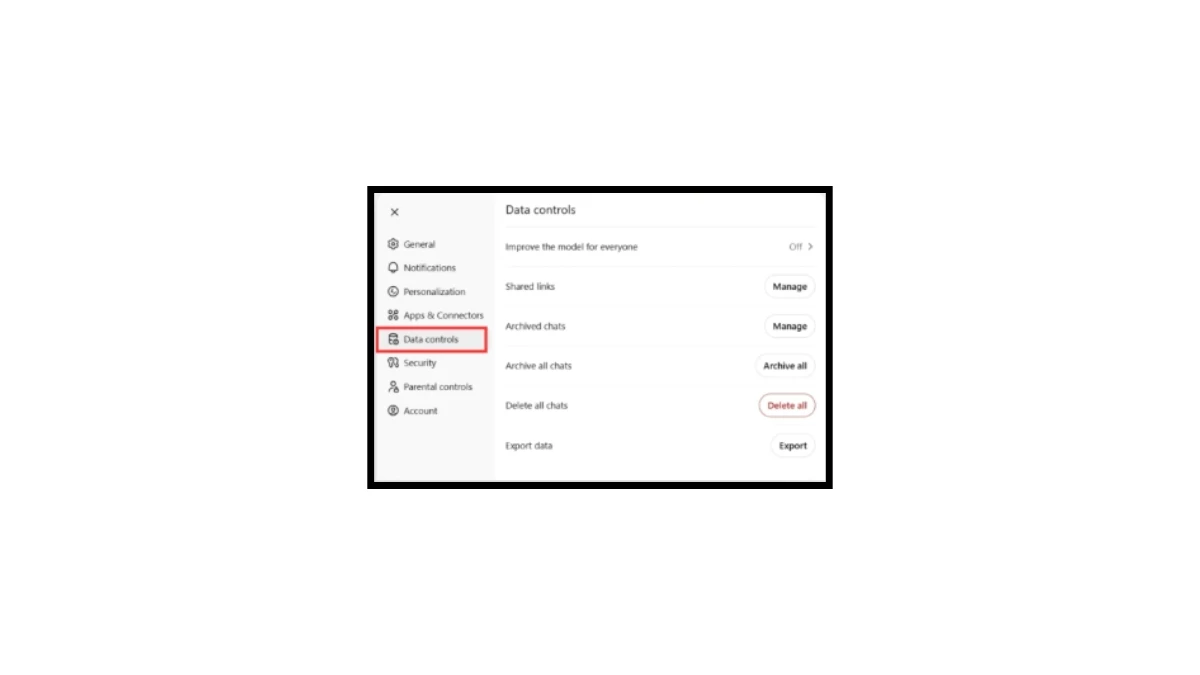
4. Opt Out of Model Training and Media Inclusions: Still in Settings > Data Controls (or a related Model Improvement section), turn off "Improve the model for everyone" to stop your prompts and uploads from training OpenAI's models. Also, disable "Include your audio recordings" and "Include your video recordings" if using voice or video modes; these are often off by default, but confirm they're toggled off to avoid sharing multimedia data.
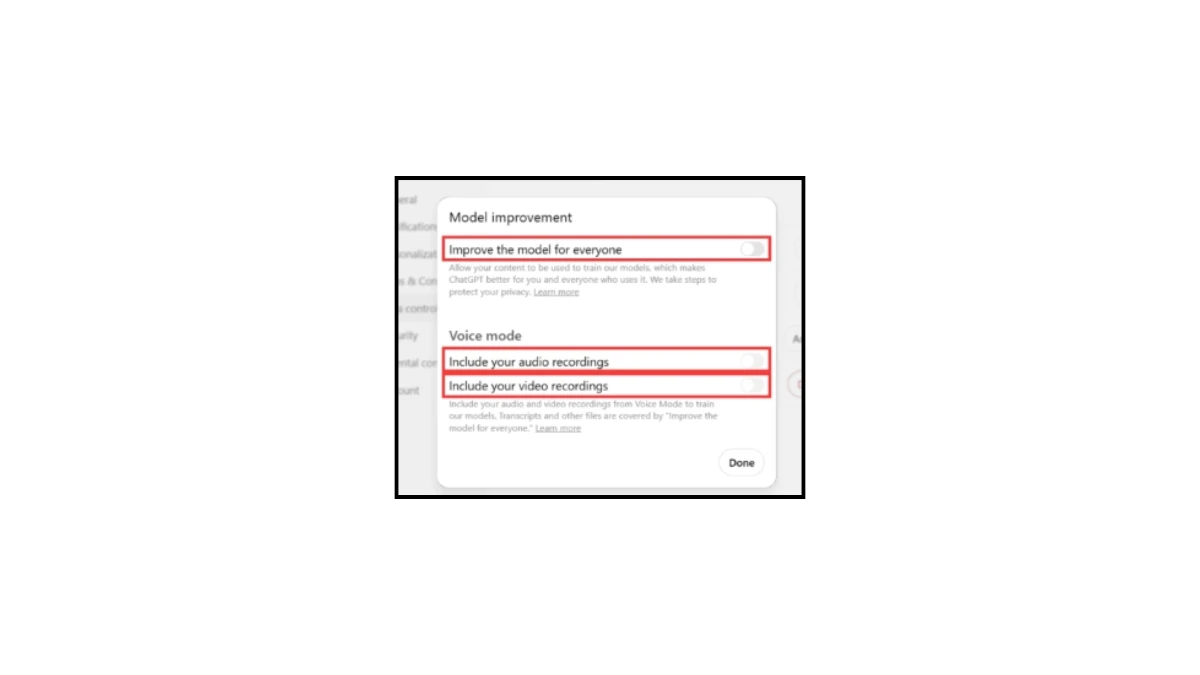
5. Additional Best Practices for Extra Protection: Use Temporary Chats for one-off sensitive queries (enable via New Chat > Turn on Temporary Chat). These aren't saved in history, don't create memories, and are deleted after 30 days.
- Enable two-factor authentication (2FA) in Settings > Security > Multi-factor authentication for account security.
- Review and disconnect third-party connectors (e.g., Google Drive) in Settings > Account > Connectors or Connected Apps to limit data sharing.
- Stick to neutral topics in regular chats, think before typing anything personal, and stay informed by checking OpenAI's help center for policy updates.
By following these steps, you can minimize data retention and usage while still leveraging ChatGPT productively. Remember, changes apply to new data; prior interactions can't be retroactively removed from trained models, but opting out now prevents future issues.
help. If your interface looks different, double-check OpenAI's official settings page for any recent tweaks.
AI as a Tool, Not a Confidant
Your ChatGPT conversations aren't as private as you might think, especially when safety is on the line. OpenAI's update is a necessary step toward responsible AI use, but it serves as a crucial reminder for all of us: Leverage these tools for what they're great at, boosting creativity and efficiency, while keeping the truly personal stuff locked away.
In the end, treat AI like a helpful colleague, not a secret-keeper. Stay smart, stay safe, and keep those conversations productive. What are your thoughts on this? Have you adjusted how you use ChatGPT? Share in the comments below, we'd love to hear!
Disclaimer: The privacy settings and steps described above are accurate as of December 2025 based on OpenAI’s current interface and publicly available policies. OpenAI may change these options, menu locations, or data-handling practices at any time without notice. These steps reduce, but do not eliminate, data retention and review risks, especially in cases of legal obligations or imminent-threat flags. Always verify the latest settings directly in your ChatGPT account and consult OpenAI’s official Privacy Policy for the most up-to-date information.